
Support
On the Slotornado Casino site: Support sheet: documents, deposit and withdrawal steps, app installation, contact.





Contact
At Slotornado Casino: Live chat: corner of every page. Email: support@slotornado.com. Include: player ID, short description, screenshots.
Verification & Documents
Verification
Inside Slotornado Casino: Location: Profile → Verification. Fields: identity, address, payment. One clear photo or scan per field.
Uploads and withdrawals are reviewed; more may be requested. Matching names speed up review.
Documents
Identity
Accepted: passport, ID card, driving licence, other official document.
Address
Accepted: utility bill, phone bill or bank statement with full name and address.
Payment
Accepted: online-banking screenshot or photo, statement, Skrill page; deposit visible.
Formats: JPG, PNG, PDF. Max 10 MB per file.
Deposits
On the Slotornado Casino site: Deposit button: methods and minimums. Seen at our check: crypto (BTC from 0.00035, LTC from 0.5, USDT from 20), MiFinity, open banking from C$30 equivalent.
Bonus code: enter before paying, not after.
Withdrawals
Slotornado Casino players get this: Location: Cashier → Withdraw. Select method and amount. Precondition: wagering of any active bonus completed. Every request is checked; identity and payment details may be requested.
Bonus winnings are capped; see the offer you used.
App
Type: web app. No store download. Steps below.
Android
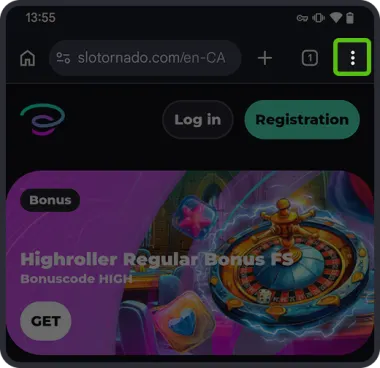 1
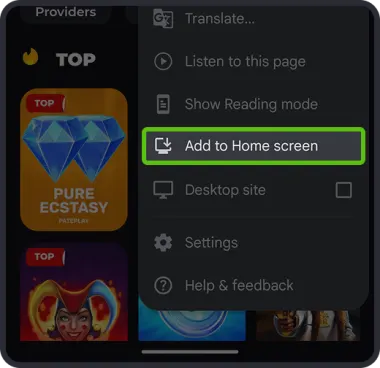
Open the site in Chrome, tap the three-dot menu.
 2
Select “Add to Home screen”.
 3
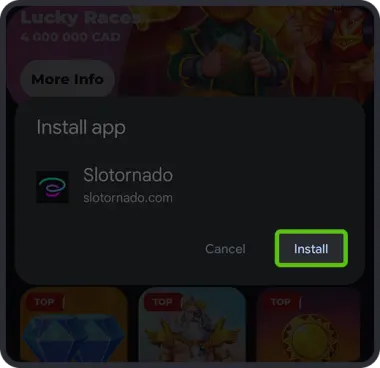
Confirm with “Install”.
iOS
 1
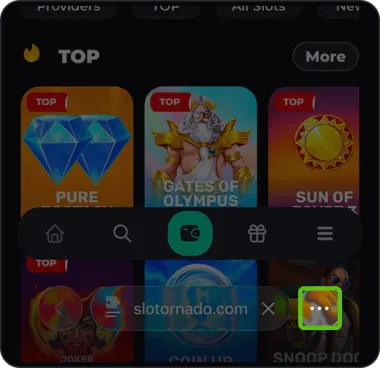
Open the site in Safari, tap the three dots in the address bar.
 2
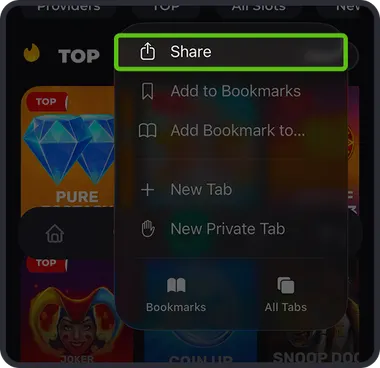
Tap “Share”.
 3
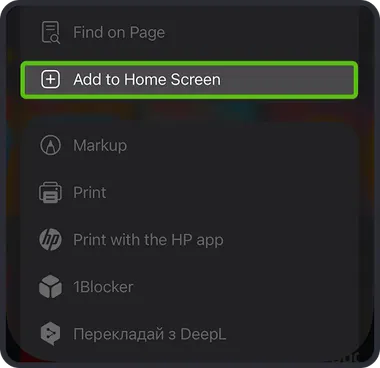
Select “Add to Home Screen”.
 4
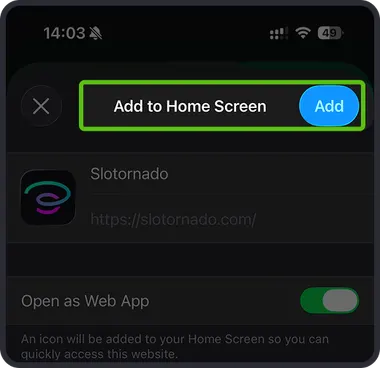
Tap “Add” at the top right.